
You've just had a new conference or journal paper published. You rush to Google Scholar, type in your name or the title, and... nothing. This is a common and stressful moment, but it's almost always explainable.
Google Scholar is not an instant database; it is a web crawler that periodically scans academic websites. "Automatic" does not mean "immediate." Here are the most common reasons why your paper isn't showing up yet, and what you can do to fix it.
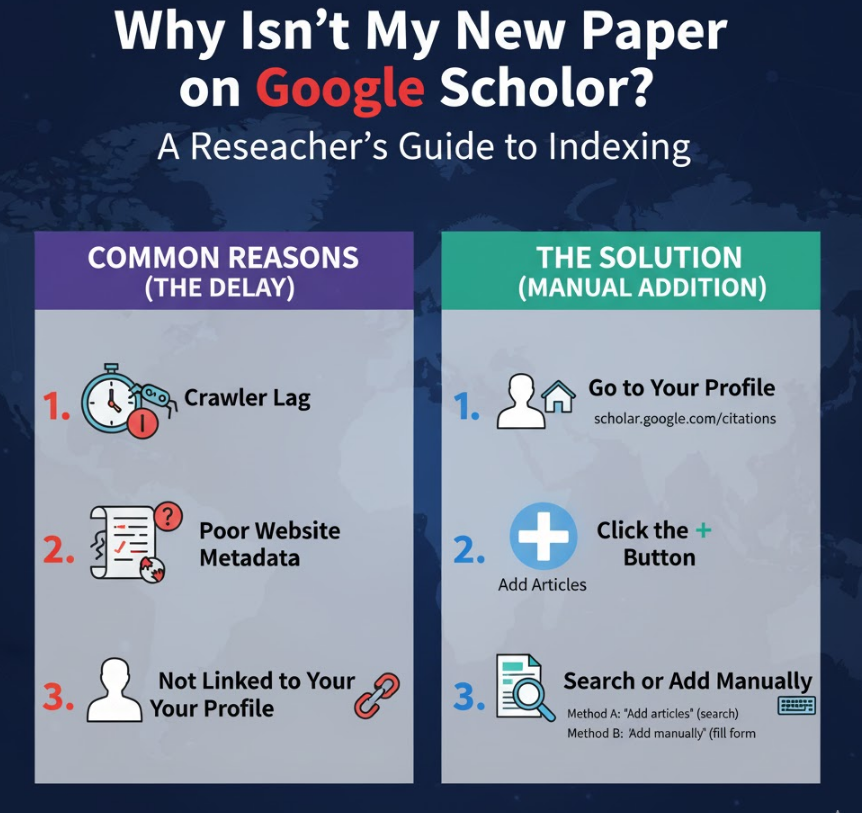
This is the most likely reason. Google's crawlers have to scan billions of pages. They do not crawl the entire web every day.
Publisher's Schedule: After your paper is published, the publisher first has to post it on their own site.
Crawler's Schedule: Google Scholar's crawlers then have to visit that publisher's site. This "crawl budget" is prioritized for large, frequently updated sites (like IEEE, Springer, Elsevier).
Indexing Time: After being crawled, the paper must be processed and added to the index.
What to do: If your paper was published in the last 1-6 weeks, the best advice is simply to be patient. It will almost certainly appear on its own.
Google Scholar's crawlers are robots, and they need to be able to understand a webpage.
Poor Metadata: The publisher's website might not have clear, machine-readable metadata (e.g., <meta> tags for citation_title, citation_author) that identifies the text as a scholarly article.
Obscure Venues: If you published in a very new, small, or obscure journal or conference, Google's crawlers may not know the site exists or may not visit it often.
Incorrect File Format: If the publisher has only uploaded a scanned image of the paper (a non-text PDF), Google's crawlers cannot read it.
What to do: Publish in reputable, well-established venues that are known to be indexed by Google Scholar.
This is a very common point of confusion. The paper might be in Google Scholar's main index, but it hasn't been automatically associated with your personal Google Scholar Profile.
What to do: Follow the steps in Part 2 to search for the paper outside of your profile.
While you cannot force Google to index a website, you can manually add any publication to your own Google Scholar Profile. This is the best and most direct solution.
This process also acts as a strong "hint" to Google to find the paper if it's not indexed yet.
Log in to the Google Account associated with your profile and go to "My Profile."
Look for the + (Add) button located below your name and co-author list.
You will see three options. Try them in this order:
Method A: "Add articles" (The Best First Step)
This opens a search window. Google Scholar will search its entire index for articles that look like yours but are not yet linked to your profile.
Search for your paper's title (using " quotes for an exact match, e.g., "A Study of Machine Learning") or your own name.
If you find your paper, select it and click the blue "Add" button. This means the paper was indexed, just not linked to you. This is the ideal outcome.
If you cannot find it, proceed to Method B.
Method B: "Add article manually" (The Failsafe)
If your paper does not appear in the search, it means Google Scholar has not indexed it at all yet.
Choose "Add article manually" from the + menu.
You will be given a form to fill in all the details: Title, Authors, Publication Date, Journal, Volume, Issue, Pages, and Publisher.
Fill in this information as completely and accurately as possible.
Click the blue "Save" button.
The paper will now appear on your profile immediately. This ensures anyone who visits your profile will see your new publication, and it will be included in your personal citation metrics.
To make Google Scholar's job easier and get your work indexed faster:
Create and Maintain Your Profile: This is the single most important thing you can do. A public, up-to-date profile helps Google's algorithm associate new work with you.
Self-Archive in a Repository: Upload your paper (the preprint or post-print, check your publisher's policy!) to your university's institutional repository or a public repository like arXiv, ResearchGate, or Academia.edu. Google's crawlers are excellent at finding papers in these locations.
Add it to Your Personal Website: If you have a personal academic website, create a "Publications" page and list your paper with a clear title and link. Ensure your website is crawlable by Google.
Don't panic if your new paper isn't on Google Scholar the day after publication. There is a normal crawler lag of several weeks. The best solution is to be proactive: wait a week or two, and if it's still missing, use the "Add article manually" feature on your Google Scholar Profile to ensure your colleagues and the community can see your latest work.