
You’ve done the hard part: the research is complete, the data is analyzed, and the conclusions are written. But before you can submit your paper, you face one final, critical hurdle: formatting. This is where the conference paper template becomes the most important file on your computer.
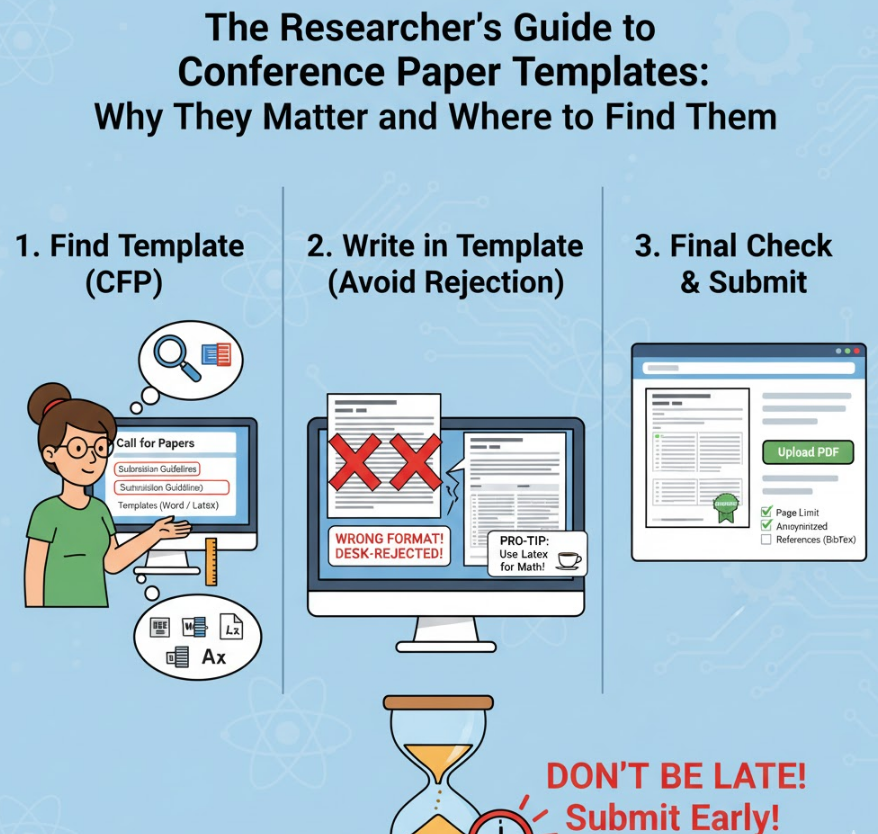
Too many researchers, especially those new to publishing, underestimate the importance of the template. They believe their revolutionary findings will outweigh a few formatting errors. They are almost always wrong.
This guide explains what templates are, why they are non-negotiable, and where to find the exact one you need.
A conference paper template is a pre-formatted document file (usually in Microsoft Word or LaTeX) provided by the conference organizers or publishers (like IEEE or ACM).
This single file dictates everything about how your paper must look, including:
Page Margins
Column Layout (e.g., single or double-column)
Font Types and Sizes (for the title, headings, body text, and captions)
Line Spacing
Abstract and Keyword Styling
Reference Format (e.g., [1] vs. (Author, 2025))
It is not a suggestion; it is a strict rulebook.
Using the correct template is the first test of your professionalism and your ability to follow instructions.
To Avoid "Desk-Rejection" This is the most critical reason. "Desk-rejection" is when a paper is rejected by the conference editor before it is even sent out for peer review. The number one reason for desk-rejection is a failure to follow formatting guidelines. If you don't use the template, you are signaling to the editors that you can't follow basic rules, and they will simply discard your submission.
To Ensure Uniformity and Readability The final conference proceedings will contain hundreds of papers. Templates ensure that every paper has a consistent, professional appearance. This makes the proceedings easier for all attendees to read and navigate.
To Guarantee Fairness Templates enforce strict page limits. A 10-page limit is a 10-page limit. By setting the margins, font, and spacing, the template ensures that no author can "cheat" by shrinking the font or margins to cram in more content. This creates a level playing field for everyone.
Never guess and never reuse an old template from a different conference. Always find the specific template for the exact conference you are submitting to.
The "Call for Papers" (CFP) Page: This is the most common place. The CFP will almost always have a "Submission Guidelines" or "Author Kit" section with a direct link to the template files.
The Conference Website: Look for menu items like "For Authors," "Submissions," or "Paper Formatting."
The Publisher's Portal: If the conference is sponsored by a major publisher, you can often find the template on their main site.
For IEEE conferences: Search for the "IEEE Author Center" or "IEEE conference templates."
For ACM conferences: Search for the "ACM Master Article Template."
You will almost always be given two options.
Word (.doc, .docx): Common in many fields, especially the humanities and social sciences. It's generally easier for beginners to use.
LaTeX (.tex): This is the standard in Computer Science, Engineering, Mathematics, and Physics. While it has a steeper learning curve, it is far superior for typesetting complex equations, managing bibliographies (with BibTeX), and ensuring perfect formatting. Platforms like Overleaf (a cloud-based LaTeX editor) make it much easier to use.
Pro-Tip: If you are in a field that uses LaTeX, use the LaTeX template. It will save you hours of formatting headaches, especially with equations and references.
Do not treat the template as an afterthought. Download it before you start writing. Write your paper directly into the template from day one. Do not change the margins, fonts, or line spacing.
Respecting the template is the first step in a successful submission. It shows the reviewers and editors that you are a serious, careful, and professional researcher.