
Have you ever had this thought? "I love the simplicity and broad reach of Google Scholar, but I need the guaranteed quality of the Web of Science (WOS) Core Collection. How can I get both in one place?"
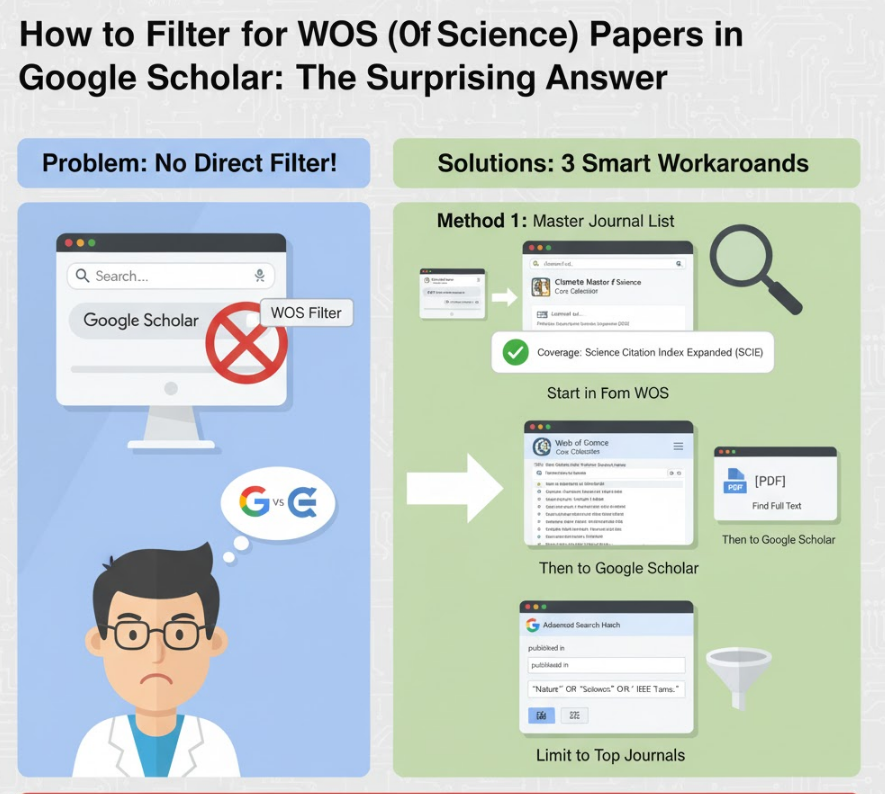
It's a perfect idea, but unfortunately, there is a very simple and direct answer: You cannot directly filter Google Scholar results to show only WOS Core Collection papers.
Google Scholar and Web of Science are products from two different, competing companies (Google and Clarivate). They do not share data in this way.
Google Scholar is an automated indexer (a search engine). Its goal is to be broad and crawl everything that looks like an academic paper (journals, pre-prints, conference papers, theses).
Web of Science (WOS) is a curated database. Its goal is to be selective. Its experts manually choose high-impact journals (like SCIE, SSCI) to include in its "Core Collection."
Google has no access (or incentive) to label its search results with its competitor's premium index.
However, you can use the following three workarounds to effectively achieve the same goal, combining the power of both platforms.
This is the most 100% accurate and recommended method. You use Google Scholar for discovery and the official WOS list for verification.
Search on Google Scholar: Use Google Scholar as you normally would to find relevant papers on your topic.
Identify the Journal Name: When you find a paper you like, note the full name of the journal it was published in (or its ISSN).
Go to the MJL Website: Open the official Clarivate Master Journal List (MJL) website. The URL is: mjl.clarivate.com
Search the Journal: In the MJL search box, type the journal's name or ISSN.
Check the Coverage: Look at the search result. If the journal is listed as being indexed in "Science Citation Index Expanded (SCIE)" or "Social Sciences Citation Index (SSCI)," then that paper is 100% a WOS Core Collection paper.
Note: If it says "Emerging Sources Citation Index (ESCI)," it is in WOS but not traditionally part of the "Core Collection" (which implies SCIE/SSCI).
Benefit: 100% accuracy. You get the broad discovery of Google Scholar with the gold-standard verification of WOS.
This is the most efficient workflow if your institution subscribes to Web of Science.
Start in Web of Science: Go to the Web of Science platform and perform your search. Make sure you select "Web of Science Core Collection" as your database.
Find Your Papers: Every result you see here is guaranteed to be a WOS Core Collection paper.
Copy the Title into Google Scholar: Now, take the title of a paper you found in WOS and paste it into the Google Scholar search bar.
Why do this? To use Google Scholar's unique strengths:
To find the PDF: Google Scholar is the best tool for finding a free, full-text PDF of an article.
To see broader citations: Google Scholar counts citations from non-WOS journals, pre-prints, and theses, giving you a wider (and often higher) citation count.
Benefit: You start with a pool of 100% guaranteed WOS papers and then use Google Scholar for access and expanded citation context.
This is a power-user trick. It's not 100% perfect, but it's very effective at mimicking a WOS filter within Google Scholar.
Make a Target List: Identify the top 10-15 journals in your specific sub-field. (These will almost certainly all be WOS-indexed journals).
Open Advanced Search: On the Google Scholar homepage, click the menu icon (three horizontal lines) in the top-left corner and select "Advanced search."
Use the "Published in" Field: In the advanced search pop-up, find the field "published in."
Enter Your List: Type your list of target journals, separated by "OR".
Example (AI field): "IEEE Transactions on Pattern Analysis and Machine Intelligence" OR "Nature Machine Intelligence" OR "Journal of Machine Learning Research"
Add Your Keywords: In the top field, "with all of the words," type your actual topic keywords (e.g., object detection).
This forces Google Scholar to search for your topic only within your pre-vetted list of high-quality, WOS-indexed journals.
Benefit: You stay entirely within the Google Scholar interface while dramatically increasing the quality and relevance of your results.